
Sheetwork Studio Templates
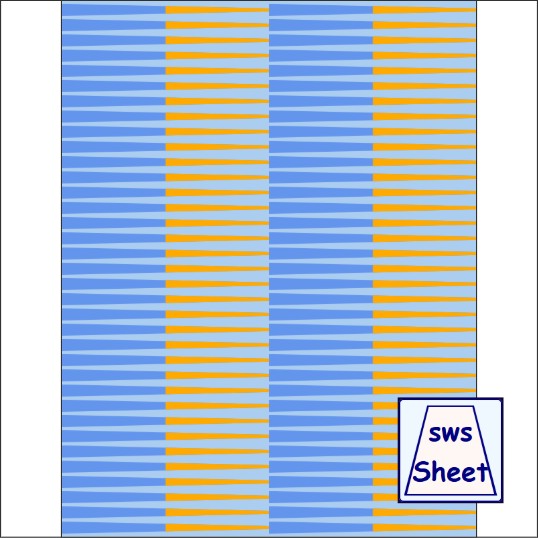
Bicone 1/4-1/16x4.25in
Mini Basic Duo50 Layout
Designed by Julie A. Bolduc
Sheet ID: s141644
Day Added: August 18 2026
Made For: Sheetworks Studio
Duo strips divide each strip into two design zones using preset percentage ratios-25/75, 33/66, 50/50, or 66/33.
Each zone can hold its own image or solid color, letting you combine patterns with plain areas, create bold color‑blocking, add accent bands, or mix simple solids with detailed images for unique effects on a rolled bead.
Duo layouts don't exist in printed papers unless you join strips end-to-end, making this a unique digital option for creating striking, custom looks on rolled beads.
Download the ZIP file and leave it exactly as it is. Do not unzip or rename it. Open Sheetworks Studio and choose File → Import New Template. The app will install the template automatically. Please note: Importing templates in Sheetworks Studio requires a purchased registration number. With one single purchase, you can download and import as many templates as you want — no additional fees, no in‑app charges.
Sheetworks Studio 3.0.2 - 449 Templates Included
Sheetworks Studio 3.0.2 is your free crafting workspace for printing accurate templates, bead strips, quilt blocks, labels, and creative project sheets. Every page is sized for US Letter paper and engineered for clean cuts, perfect alignment, and smooth creative flow.
The updated version of Sheetworks Studio has officially arrived! Updated Folder System and More organized categories. More templates included!
Sheetworks Studio is a one‑time purchase of $100. That’s it — no subscriptions, no monthly fees, and no extra charges. All templates released for Sheetworks Studio are free to download and can be imported directly into the app.
All items in our online shop ship free within the US only. I currently offer U.S. shipping only and it is from rural Maine. Delivery can vary from 2–14 days depending on your distance from Maine. Expedited shipping is not available.
Please note: I am now selling all of my paper bead making tools and other items from this web site using Paypal payments.
I have removed all of my paper bead making tools from Amazon. My Kindle crochet pattern books and paper template paperback books continue to be available on Amazon, as they are printed and fulfilled directly by Amazon. If you would like to shop my Etsy Store, follow the link in the header above.
Random Quick Tip!
Cutting Mat Not Sticky Enough?If the cutting mat you use with your electronic cutting machine no longer is sticky, you can use painter's tape to keep the paper or cardstock you are cutting on the mat. Just put pieces of tape on all four sides and 4 corners about a couple of inches long each. I am doing this each time I need to cut more shapes for my English Paper Piecing project. These are for the shapes I cannot cut with my Accuqilt dies.